Updated forum software

MyE28.com Forum system comments and questions. Please post registration, login, or general forum usage problems here.
Post Reply
cactusjacks1
Posts: 520
Joined: Feb 12, 2006
Location: Orange County CA

Re: Updated forum software

Post by cactusjacks1 »

I'm sure it was a lot of work & thanks for taking on the task, It is great!! I'm getting used to it. When you go to the "new posts" page, the thread titles are all the same brightness. Would it be possible to make those read change to a lighter color - so that when you have read a thread & return to the subject page, you could quickly see where you are? A number of sites offer that & it helps speed things up to return you to your place in the thread list?

Nice work, :banana:
Jack
cddallara
Posts: 3513
Joined: Apr 03, 2010
Location: Lagunitas, Ca

Re: Updated forum software

Post by cddallara »

I'm looking for the quick reply box, but don't see it.
:dunno:
davintosh
Posts: 13964
Joined: Jan 28, 2009
Location: Sioux Falls, SD
Contact:

Re: Updated forum software

Post by davintosh »

I came here to make a comment about links not spawning a new page/tab, but I see Mike already started in on that so I'll just say I'm on the fence about it. But then I'm the guy who has to restart his browser every week or so because of links I've clicked to stuff I meant to read but never got around to. The row of tabs gets a little crowded with ~15 or so in a window. So part of me is happy that the links open in the same tab. For now.
Karl Grau wrote:
cek wrote:let me still see those witty text signatures.
Example of witty text signature?
Even if there were witty text text signatures, losing them is a small price to pay to get rid of gynormous sig pics (which is why I have sigs turned off). I have Tor's sig pic as my desktop background.
Why would you of all people have them turned off? :shock: :confused: I don't believe you.
davintosh
Posts: 13964
Joined: Jan 28, 2009
Location: Sioux Falls, SD
Contact:

Re: Updated forum software

Post by davintosh »

Hey, what happened to the forum selector doodad that used to be at the bottom of every page? Just when I was getting used to using that thing... Doggonnit you guys. :evil:
Karl Grau wrote:I’m having a sad because when I try to post one of my hilariously funny sig pics, I get this message:
:(

Your images may only be up to 150 pixels high.
Your images may only be up to 300 pixels wide.
Something tells me Jeremy had something to do with this one. I wonder how many characters it'll take. ;) Let's find out... :banana:
davintosh
Posts: 13964
Joined: Jan 28, 2009
Location: Sioux Falls, SD
Contact:

Re: Updated forum software

Post by davintosh »

cek wrote:
Karl Grau wrote:I’m having a sad because when I try to post one of my hilariously funny sig pics, I get this message:
:(

Your images may only be up to 150 pixels high.
Your images may only be up to 300 pixels wide.
I'd give my left nut for a feature that allowed me to suppress showing signature pictures, but let me still see those witty text signatures. I am so sick of threads that look like this:
That wouldn't be a problem if people were conscientious enough to click off the "Attach signatures..." box when they have multiple comments in a thread. I try to remember that, but it gets harder to remember that with the crowd of smilies on the right of the text box that pushes the options so far down in a window (can we do something about that?)

Image
Jeremy
Beamter
Beamter
Posts: 15846
Joined: Feb 12, 2006
Location: Connecticut

Re: Updated forum software

Post by Jeremy »

davintosh wrote:Something tells me Jeremy had something to do with this one. I wonder how many characters it'll take. ;) Let's find out... :banana:
Believe it or not, I was not directly involved in that at all.
cddallara
Posts: 3513
Joined: Apr 03, 2010
Location: Lagunitas, Ca

Re: Updated forum software

Post by cddallara »

davintosh wrote:Hey, what happened to the forum selector doodad that used to be at the bottom of every page? Just when I was getting used to using that thing... Doggonnit you guys. :evil:
This. Seriously.

Also, still no multiquote tab?

Look at me all whiny and moany over here...

Sorry, but IMO, key features:
Quick reply
Navigation tab
Multiquote
davintosh
Posts: 13964
Joined: Jan 28, 2009
Location: Sioux Falls, SD
Contact:

Re: Updated forum software

Post by davintosh »

davintosh wrote:Hey, what happened to the forum selector doodad that used to be at the bottom of every page? Just when I was getting used to using that thing... Doggonnit you guys. :evil:
It's back! Glory hallelujah! :wrenchtime: :wrenchtime:

And the Smily selection has been whittled down so the Save draft / Preview / Submit buttons are right below the edit box. Thanks guys! This forum is getting awesomer by the minute!

Speaking of the Save draft thingy, it's kinda cool, now that I've dug around and found where the drafts are saved. If you're wondering, go to your User Control Panel / Overview / Manage Drafts. But there doesn't seem to be a way to automagically save it to the thread from which it came; The only options are to view, edit and delete a saved draft. Is it necessary to open the draft, copy the content, go to the proper thread, create a new comment, then paste the content in?

Oh wait; never mind. Now I see; once you've saved a draft for particular thread, if you click POST REPLY you get an extra button at the bottom of the text window; Load Draft. Very cool. :cool:

I love it when I answer my own questions. ;)

Forgot to add,

YOU GUYS ROCK!!!

Now we just need to fix the spelling on that "Hide font colour" button. You'd think we had a bunch of Cannooks running the show here. Eh? ;)
oldskool
Posts: 12001
Joined: Jul 13, 2008
Location: coastal north carolina
Contact:

Re: Updated forum software

Post by oldskool »

Tailpipe still be broke, yo. Still can't seem to post there.
carnutdallas
Posts: 1915
Joined: Apr 13, 2008
Location: Frisco, TX
Contact:

Re: Updated forum software

Post by carnutdallas »

I was wondering why no activity with the VA and Bergdahl. Thanks for the heads up oldskool.
Jeremy
Beamter
Beamter
Posts: 15846
Joined: Feb 12, 2006
Location: Connecticut

Re: Updated forum software

Post by Jeremy »

carnutdallas wrote:I was wondering why no activity with the VA and Bergdahl. Thanks for the heads up oldskool.
Don't listen to OS. He got himself banned from there.
oldskool
Posts: 12001
Joined: Jul 13, 2008
Location: coastal north carolina
Contact:

Re: Updated forum software

Post by oldskool »

Jeremy wrote:
carnutdallas wrote:I was wondering why no activity with the VA and Bergdahl. Thanks for the heads up oldskool.
Don't listen to OS. He got himself banned from there.
Not true. That was the rat who lives in my brain. I call him "Jeremy".
davintosh
Posts: 13964
Joined: Jan 28, 2009
Location: Sioux Falls, SD
Contact:

Re: Updated forum software

Post by davintosh »

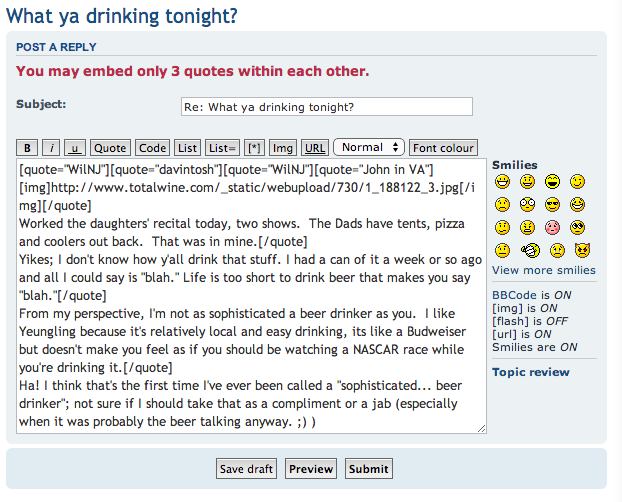
New question; is there a setting that limits the number of quotes that can be embedded within each other? I just got spanked for exceeding the new 3-quote limit. I know I've seen a lot more than that before.

Image
ElGuappo
Posts: 8138
Joined: Feb 12, 2006
Location: Sacramento, CA
Contact:

Re: Updated forum software

Post by ElGuappo »

Jeez I don't logon in a couple of weeks and things get all sideways.
This will take some getting used to.
tschultz
Posts: 4155
Joined: Mar 01, 2009
Location: Denver, Colorado
Contact:

Re: Updated forum software

Post by tschultz »

Maybe it's just me, but after using this new interface and layout, unfortunately, I find it much more tedious and tiresome on the eyes to read and navigate posts.

I vote this change in layout and coloring of the forum as a big thumbs down, and seem to have noticed that this forum has become less active over the last two weeks, likely for similar reasons. :cry: :evil: :down:

Any way we can improve the readability of posts (it used to be much better...) :rotz:
jodystevens
Posts: 314
Joined: Oct 10, 2013
Location: Canada

Re: Updated forum software

Post by jodystevens »

With the old layout, when I arrived at the main screen with the different sections, the icons were a different color to let me know that there were unread threads in that section. Now I have no way of knowing and I don't feel like going into each individual section to check for unread threads.


Well I guess it is different apparently, but I'm too color blind to be able to see the difference. :(
WilNJ
Posts: 4193
Joined: Aug 12, 2009
Location: North Jersey

Re: Updated forum software

Post by WilNJ »

Are multiple quotes available in the new software?
Justin_FL
MyE28 IT Guru
MyE28 IT Guru
Posts: 2838
Joined: Feb 12, 2006
Location: Palm Beach
Contact:

Re: Updated forum software

Post by Justin_FL »

WilNJ wrote:Are multiple quotes available in the new software?
This is not a built in function.
Justin_FL
MyE28 IT Guru
MyE28 IT Guru
Posts: 2838
Joined: Feb 12, 2006
Location: Palm Beach
Contact:

Re: Updated forum software

Post by Justin_FL »

jodystevens wrote:Well I guess it is different apparently, but I'm too color blind to be able to see the difference. :(
I plan to make the unread threads more obvious.
Justin_FL
MyE28 IT Guru
MyE28 IT Guru
Posts: 2838
Joined: Feb 12, 2006
Location: Palm Beach
Contact:

Re: Updated forum software

Post by Justin_FL »

tschultz wrote:Maybe it's just me, but after using this new interface and layout, unfortunately, I find it much more tedious and tiresome on the eyes to read and navigate posts.

I vote this change in layout and coloring of the forum as a big thumbs down, and seem to have noticed that this forum has become less active over the last two weeks, likely for similar reasons. :cry: :evil: :down:

Any way we can improve the readability of posts (it used to be much better...) :rotz:
Can you be specific about the elements which are a problem, as general statements are less helpful to make changes.

I can't say that have noticed decreased posting and thread participation :dunno:
Jeremy
Beamter
Beamter
Posts: 15846
Joined: Feb 12, 2006
Location: Connecticut

Re: Updated forum software

Post by Jeremy »

I think any decreased activity lately is largely attributable to the first major event of the season (Vintage) happening recently.

The new setup isn't perfect, I know. Please try to keep your criticisms constructive though. As Justin said, we can make changes within certain limits, but we need to know what changes might be needed. He's done a damn fine job of responding to critiques thus far, so don't give up on it yet.

We're not going back to the old software, so making this new version as great as possible is the goal.
jodystevens
Posts: 314
Joined: Oct 10, 2013
Location: Canada

Re: Updated forum software

Post by jodystevens »

Justin_FL wrote:
jodystevens wrote:Well I guess it is different apparently, but I'm too color blind to be able to see the difference. :(
I plan to make the unread threads more obvious.

Excellent my good sir, you've done an excellent job this far!
cddallara
Posts: 3513
Joined: Apr 03, 2010
Location: Lagunitas, Ca

Re: Updated forum software

Post by cddallara »

Jeremy wrote:
The new setup isn't perfect, I know. Please try to keep your criticisms constructive though. As Justin said, we can make changes within certain limits, but we need to know what changes might be needed. He's done a damn fine job of responding to critiques thus far, so don't give up on it yet.

We're not going back to the old software, so making this new version as great as possible is the goal.
cddallara wrote: Look at me all whiny and moany over here...

Sorry, but IMO, key features:
Quick reply
Navigation tab
Multiquote
:crickets:

I know you got the navigation tab going, and I can't imagine the undertaking of updating the software in the first place.
Great job so far, can't wait for the wrinkles to get ironed out.
:)
Jeremy
Beamter
Beamter
Posts: 15846
Joined: Feb 12, 2006
Location: Connecticut

Re: Updated forum software

Post by Jeremy »

You seem to have this site mistaken for the typical vBulletin crap. ;)
wkohler
Posts: 50939
Joined: Oct 05, 2006
Location: Phönix, Arizona, USA
Contact:

Re: Updated forum software

Post by wkohler »

I just wanted to give more thanks for the list of subscribed threads. Way cool. My wish from 2007 has become reality.
ldsbeaker
Posts: 6134
Joined: Mar 25, 2007
Location: Slicktop City, AZ
Contact:

Re: Updated forum software

Post by ldsbeaker »

I'm having issues with Pics.

Example: OcCoupe posted a really cool update or two to his Coupe thread, and all I'm getting is

xxxxxx

Image

xxxxxx

Image
Image
Image

Is this my fault?
I've tried on the work puter (which probably blocks photobucket), and my iPad on wifi at 'home' (not blocked)... Equal Results.
tschultz
Posts: 4155
Joined: Mar 01, 2009
Location: Denver, Colorado
Contact:

Re: Updated forum software

Post by tschultz »

Justin_FL wrote: Can you be specific about the elements which are a problem, as general statements are less helpful to make changes.

I can't say that have noticed decreased posting and thread participation :dunno:

Sure, I needed to determine what it was that I am referring to. I think the prior board layout/software separated posts a little bit more, so it was more obvious where individual posts and signatures ended. This is still evident on the bigcoupe forum: http://bigcoupe.com/phpBB2/viewtopic.php?t=2847

Right now, at least for me, it seems like signatures run together into new posts, making quick skimming of posts difficult to do. Namely, this is more difficult for when searching for information on old threads, or skimming posts.
tsmall07
Beamter
Beamter
Posts: 12775
Joined: May 22, 2006
Location: Springfield, vA

Re: Updated forum software

Post by tsmall07 »

tschultz wrote: Right now, at least for me, it seems like signatures run together into new posts, making quick skimming of posts difficult to do. Namely, this is more difficult for when searching for information on old threads, or skimming posts.
I agree with this point. I keep catching myself reading people's signatures thinking is part of the post.
oldskool
Posts: 12001
Joined: Jul 13, 2008
Location: coastal north carolina
Contact:

Re: Updated forum software

Post by oldskool »

I'm still having a hard time posting in "Tailpipe". I think it's broken.
davintosh
Posts: 13964
Joined: Jan 28, 2009
Location: Sioux Falls, SD
Contact:

Re: Updated forum software

Post by davintosh »

davintosh wrote:Something tells me Jeremy had something to do with this one. I wonder how many characters it'll take. ;) Let's find out... :banana:
Alright; the new iron-fisted signature restrictions have me close to the edge. I'm trying to put a different pic in there, and got spanked on my first try because it was taller than 200 pixels. Ok, fine, I can fix that. So I scale it down so it's 200 pixels, try it again, and get spanked again. WTF? It says, "Your images may only be up to 200 pixels high." which to me means 200 pixels should be ok, so I drop it down to 199 pixels. Same error. Ditto with 198. Ok, how about 150? Same flippin deal. What gives?

Alright, I took a break, came back to it, and gave it some thought, then changed the file name on my modified image & tried again. It worked. So apparently it cached the image that I first tried using, and didn't bother updating the image when I made changes. Would that cached image eventually age off, or is renaming the file after getting that error the only way around it?

And I still have issues with the signature restrictions. The 200 pixel height I can see because we don't want sigs taking up copious amounts of vertical space, making threads unnecessarily long, but the 350 character limit is pure nonsense in this day & age. You'd think we'd all reverted back to 300 baud modems or something. :roll:

Is there a feature in the software that, if there are multiple comments in a thread by a given user with a sig, will remove the sig line from all but the first comment on a page? If not, why not? Or is that asking too much?

Is it time to move this thread to the Comments section?
Post Reply